
Case study 01 · UX / Service Design
Making admission clearer for families, and lighter for staff.
A focused redesign of the admission journey at a young bilingual school on Koh Phangan — including the website touchpoints that support it — within a broader digital transformation of how the school works.
- Role
- UX & Service Designer · Contract
- Timeframe
- May 2025 – January 2026
- Location
- Koh Phangan, Thailand
- Focus
- Admission / enrolment journey
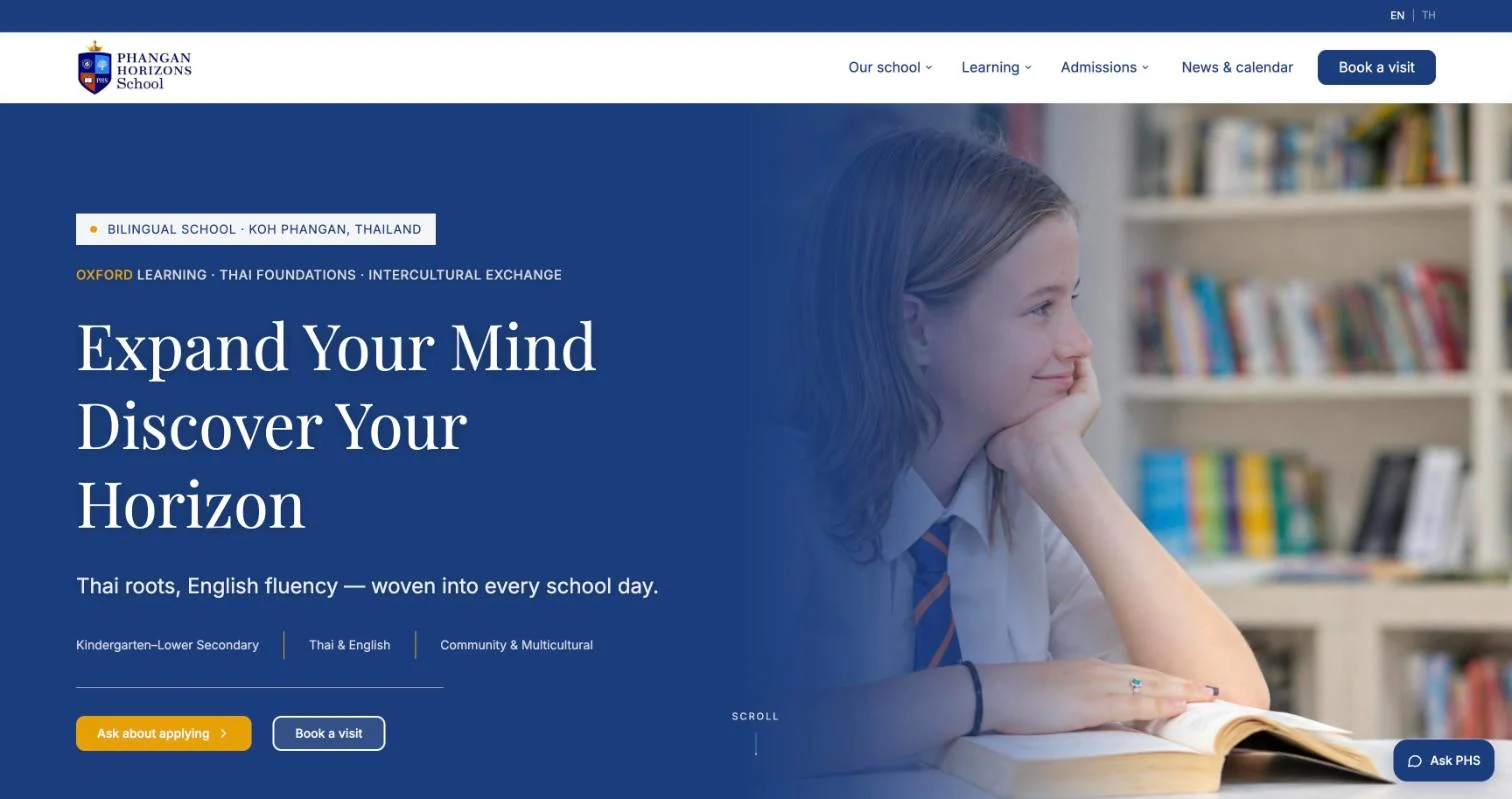
For families
Admission on the website
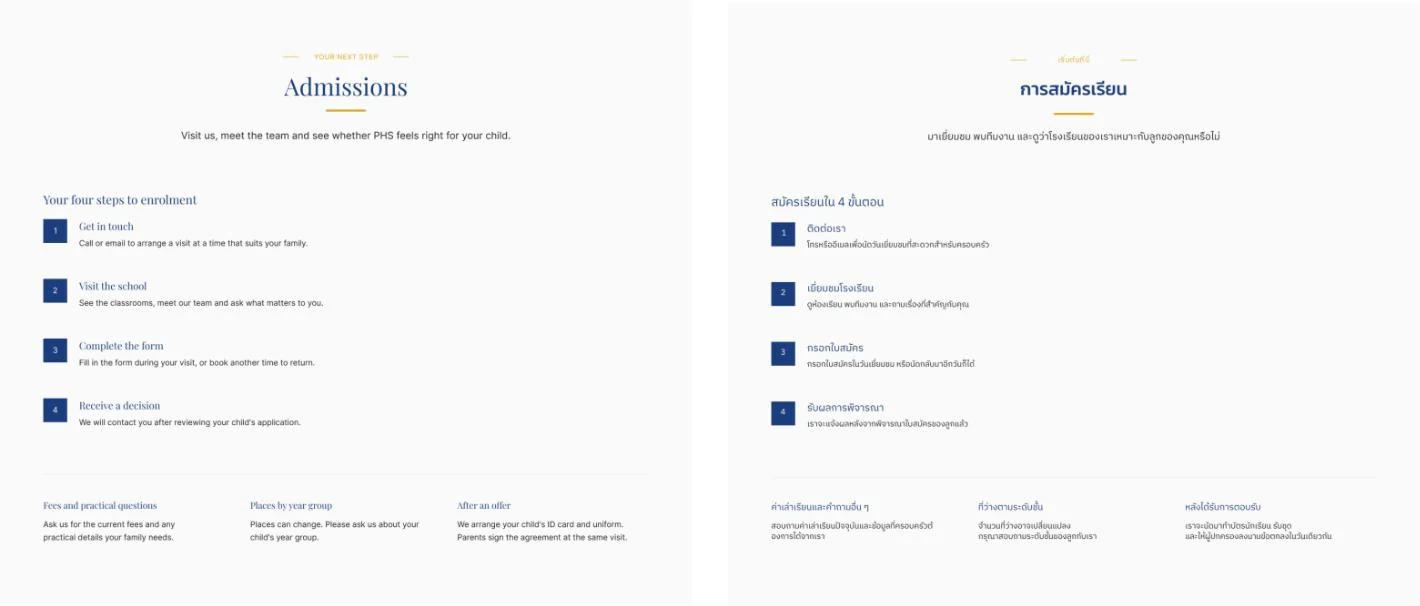
A live bilingual site with four clear steps, fees, year groups and “Ask PHS”, an AI assistant for common questions.
At registration
One record from step one
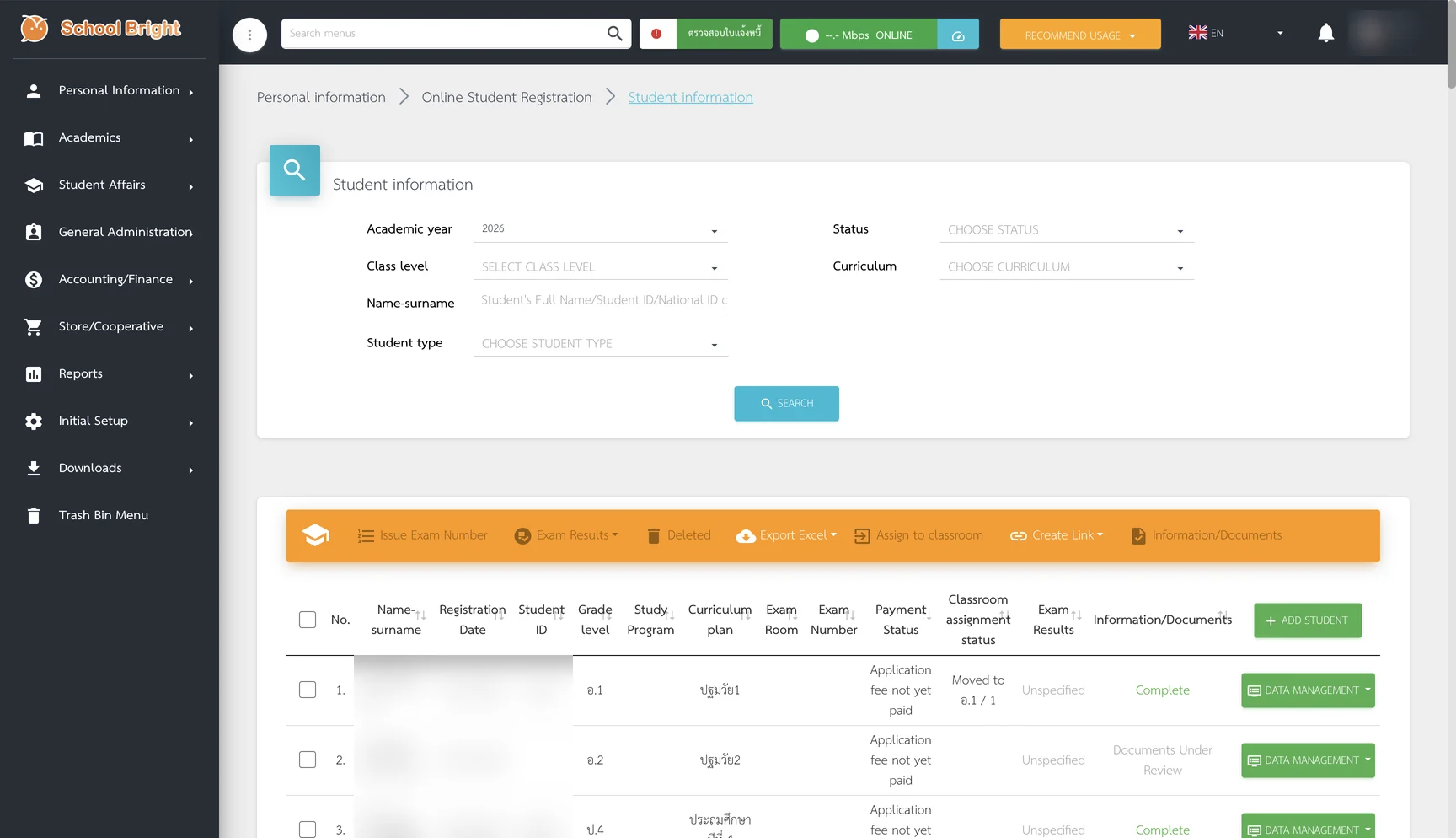
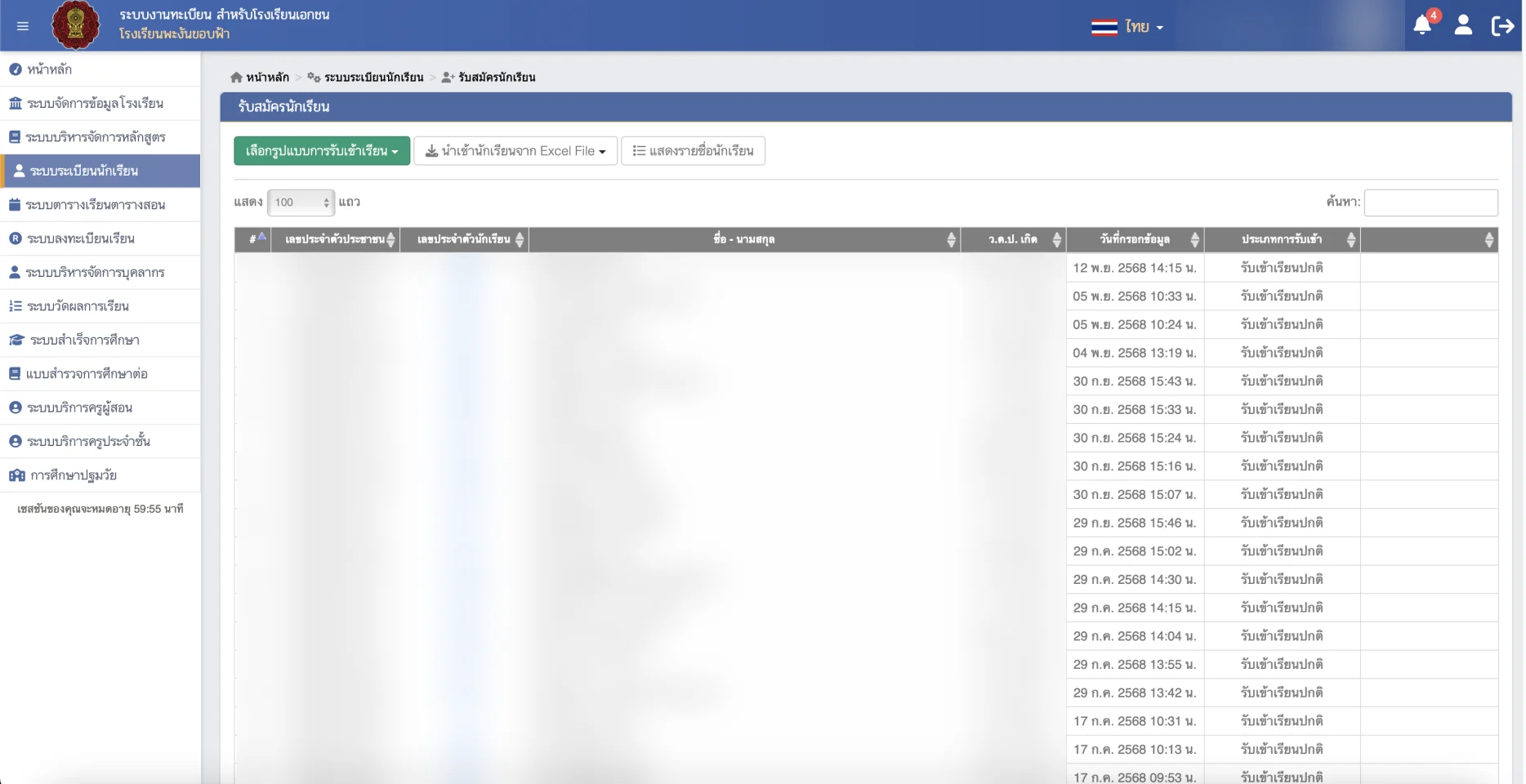
School Bright’s registration form on a school iPad replaces the paper form. Data is entered once.
For the registrar
Manual typing → one click
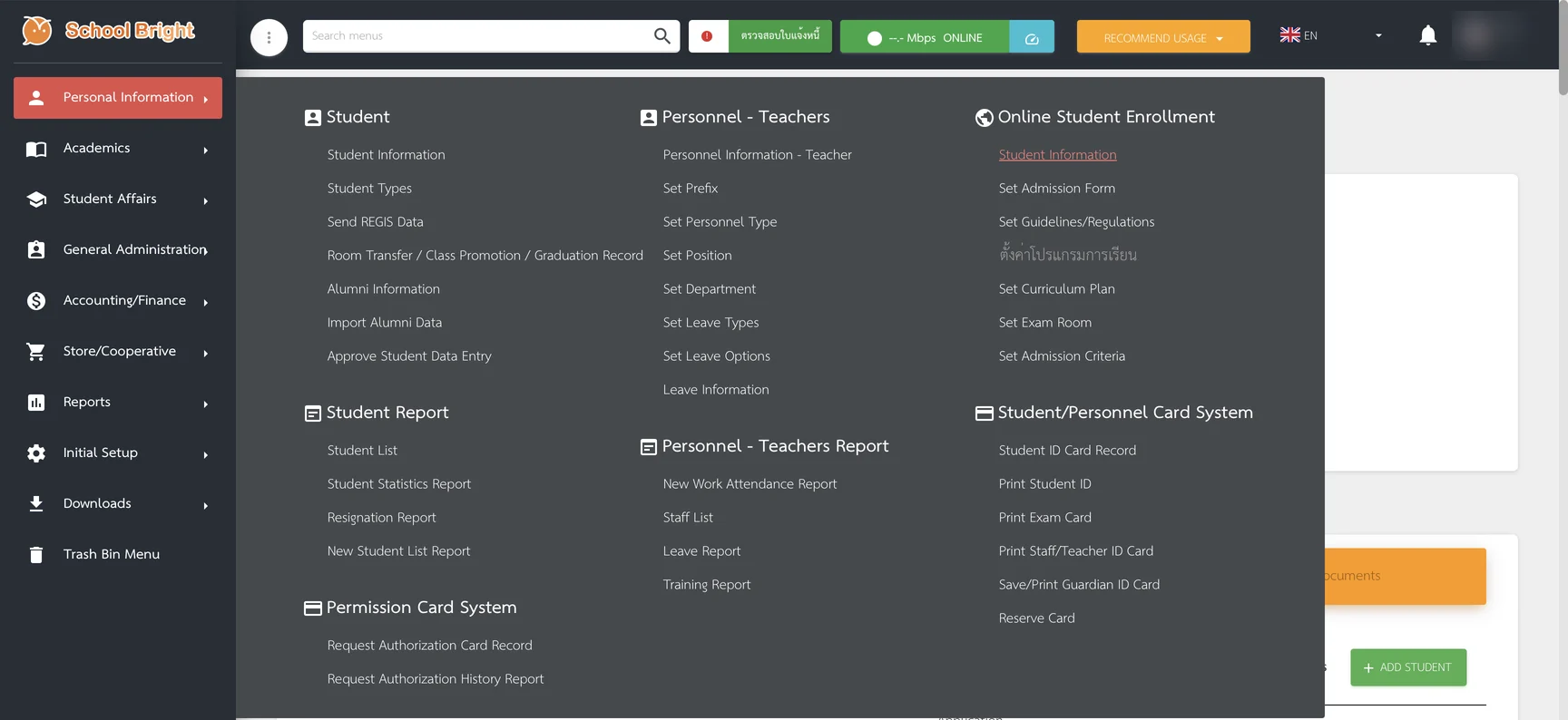
Admitted students are sent to the government registration system from School Bright, instead of typed in by hand.
01The problem
Clarity for families. Less repeated work for staff.
The school is young, multicultural and growing: around 183 students, Thai and expatriate teachers, and a mix of Thai and international curricula. Before the project, families enrolled by phone, visits and paper forms — and staff re-typed the forms into the school’s records.
01 · Information
Parents depended on personal contact because the website didn’t support self-service.
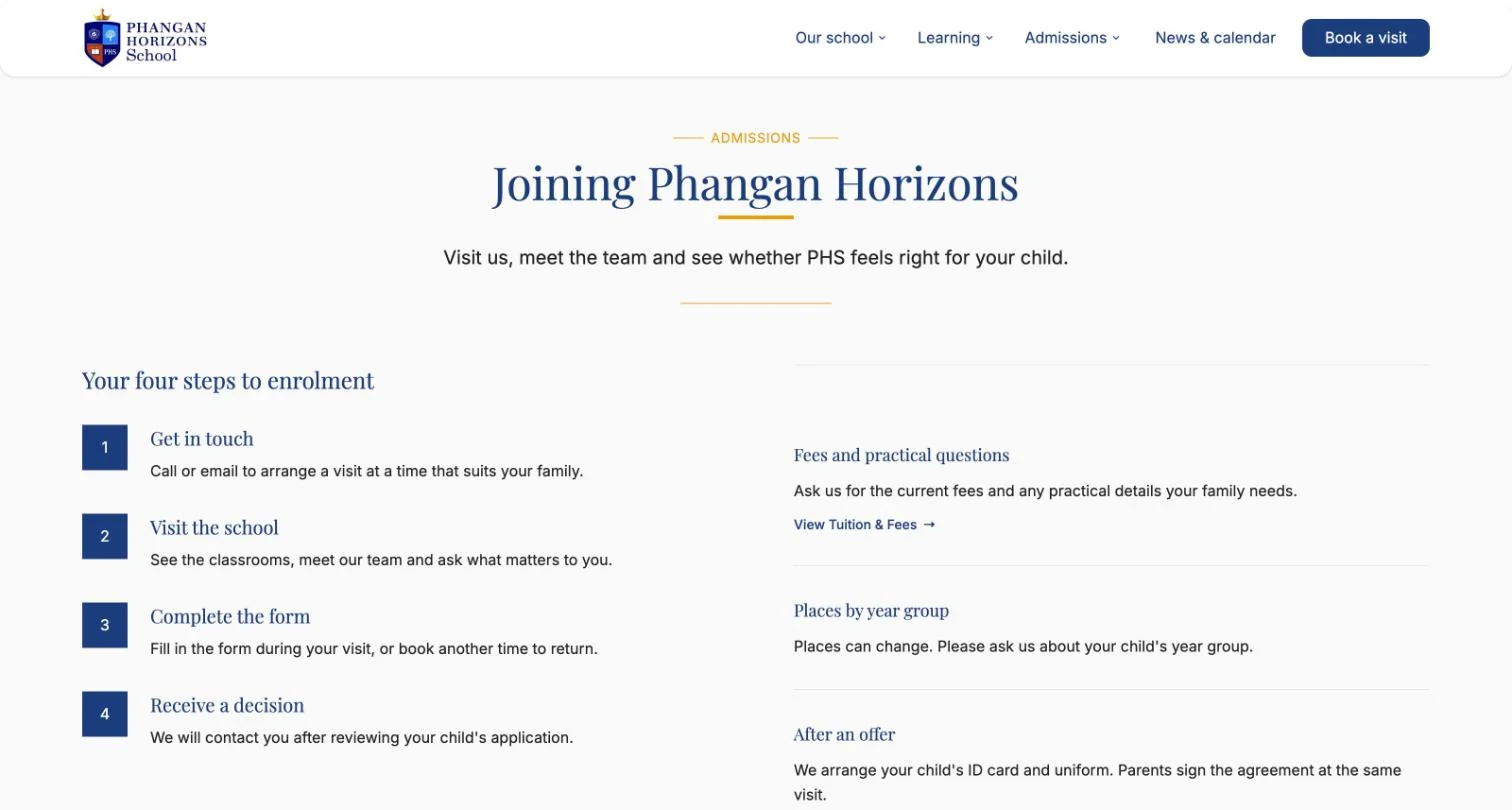
A bilingual website with admission as a top-level section: four clear steps, fees, places by year group and a year-group guide.
02 · Communication
An enquiry depended on one person’s phone and attention. There was no shared inbox or record anyone else could pick up.
One school-owned contact address on Google Workspace instead of personal phones — and “Ask PHS”, an AI assistant on the website that answers common questions and hands over to the team.
03 · Process
The manual process slowed things down and made the school look less professional than it is.
School Bright’s online registration form on a school iPad replaces the old PHS paper form — completed during the school visit or at a later appointment, keeping a personal step without the paper.
04 · Duplicated work
Staff time went into repeated data entry, and the school’s own platform had no clear place in daily work.
One record from the first step: registration data goes straight into School Bright, and after admission it is sent to the government registration system in one click — instead of being typed in again, one student at a time.
02The journey
Redesigning the journey, front and back.
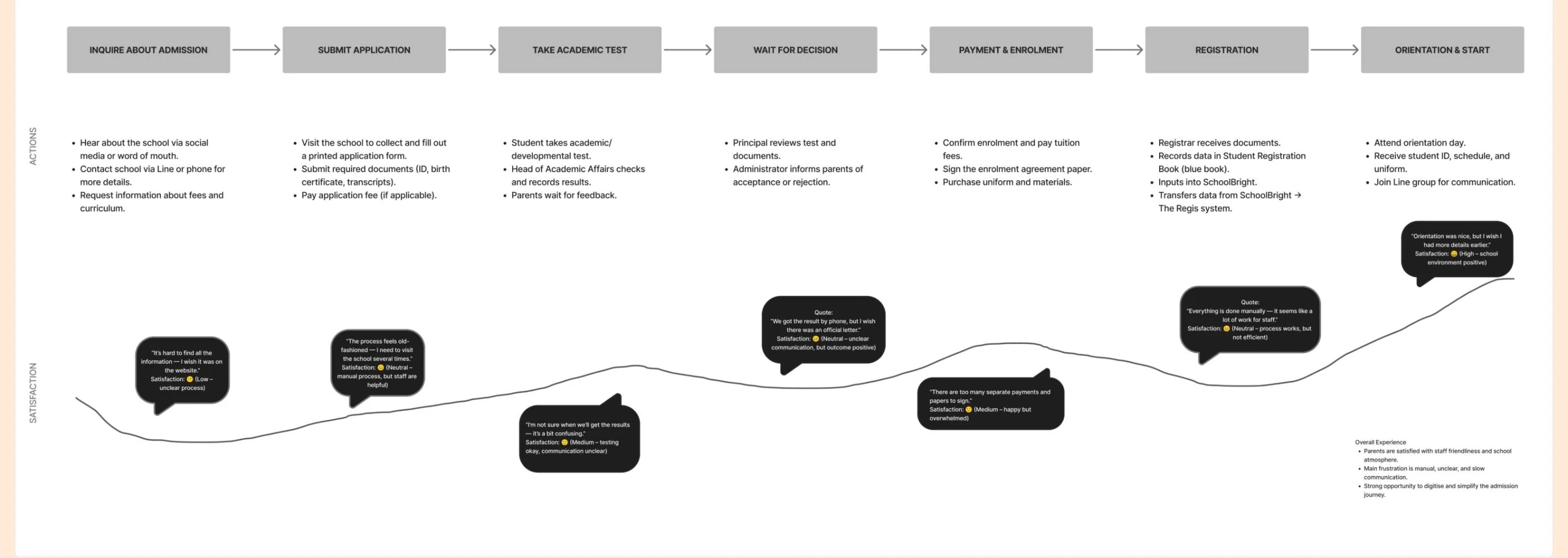
What families see is only half of admission. The research mapped how it really worked; the redesign changed both what families see and the hand-offs behind it.
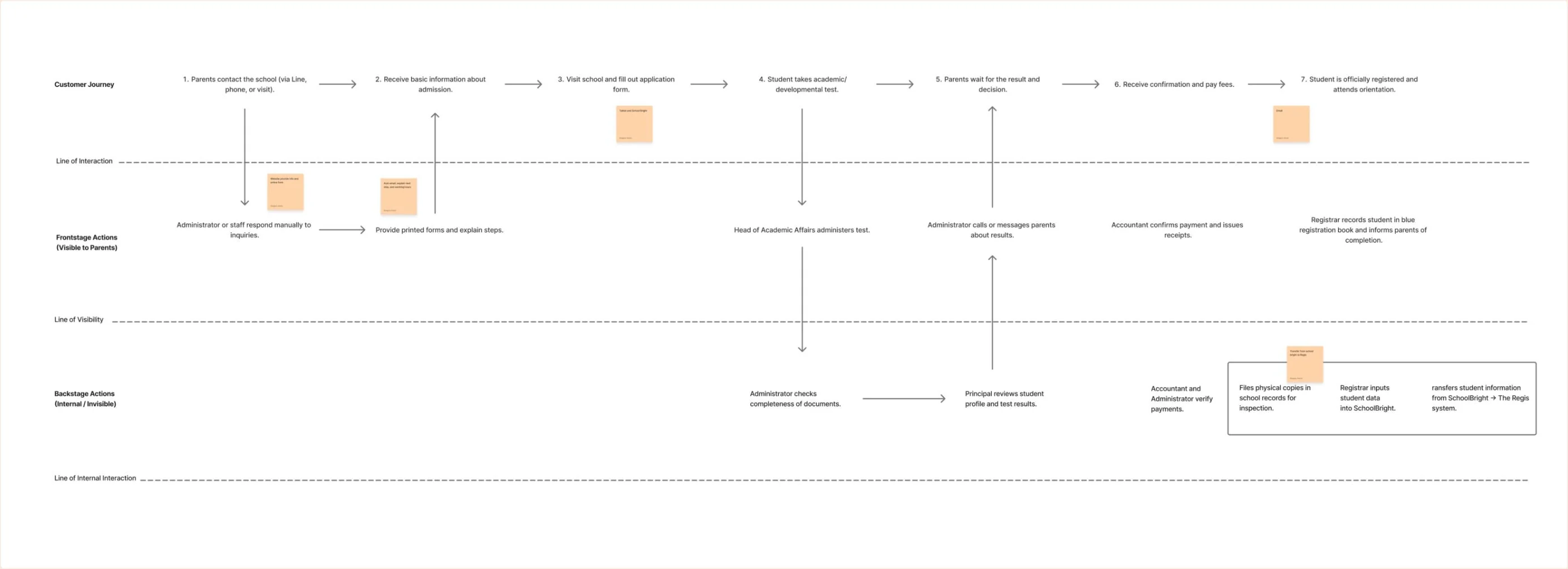
After · the service as it runs now
FamilyFrontstage
StaffBackstage
SystemsSupport
Data is entered once, in School Bright, and travels from there. People still review, approve and check each record — the transfer is one click, not a hands-off integration.
03For families
The website as the start of the journey.
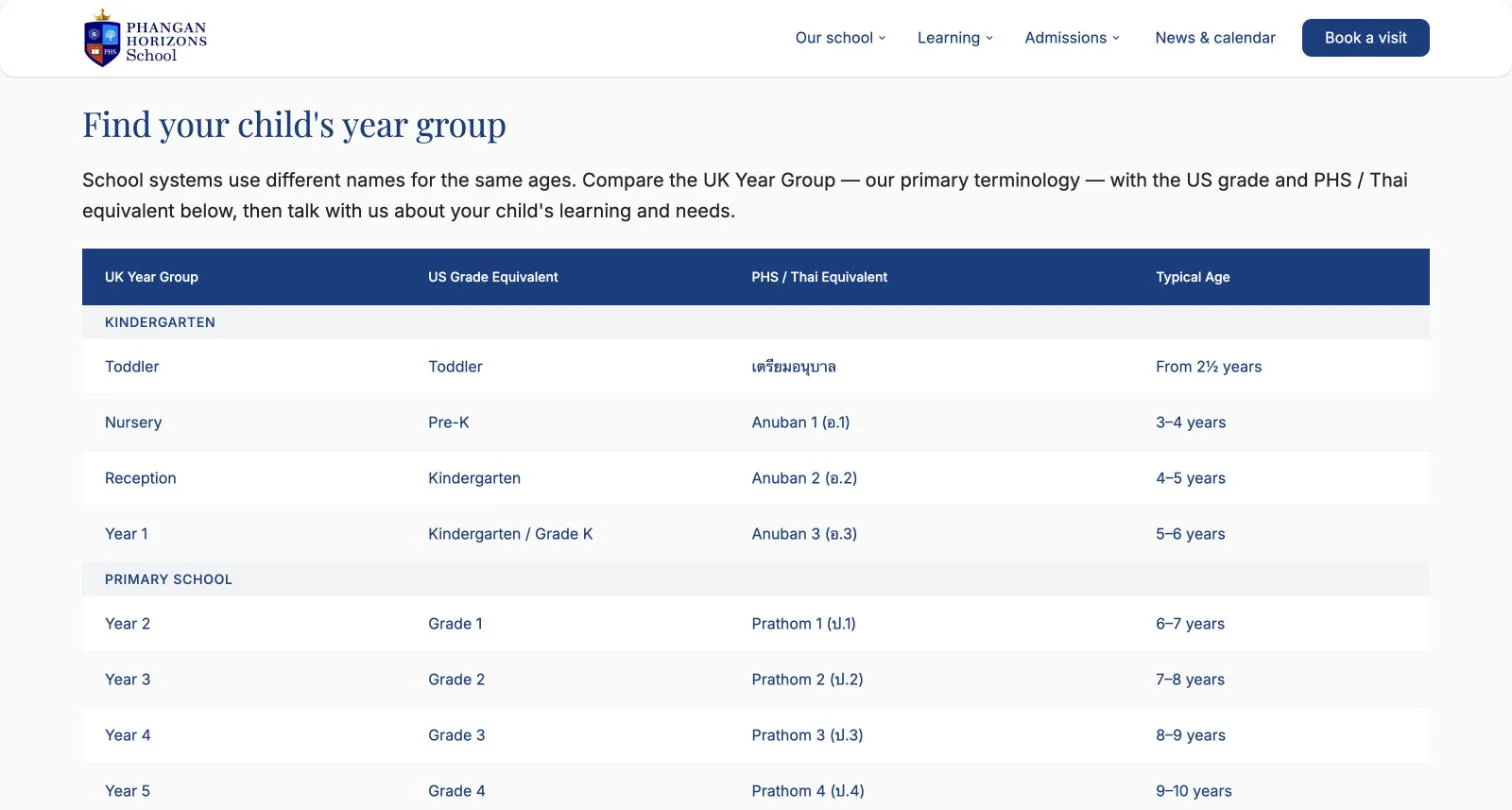
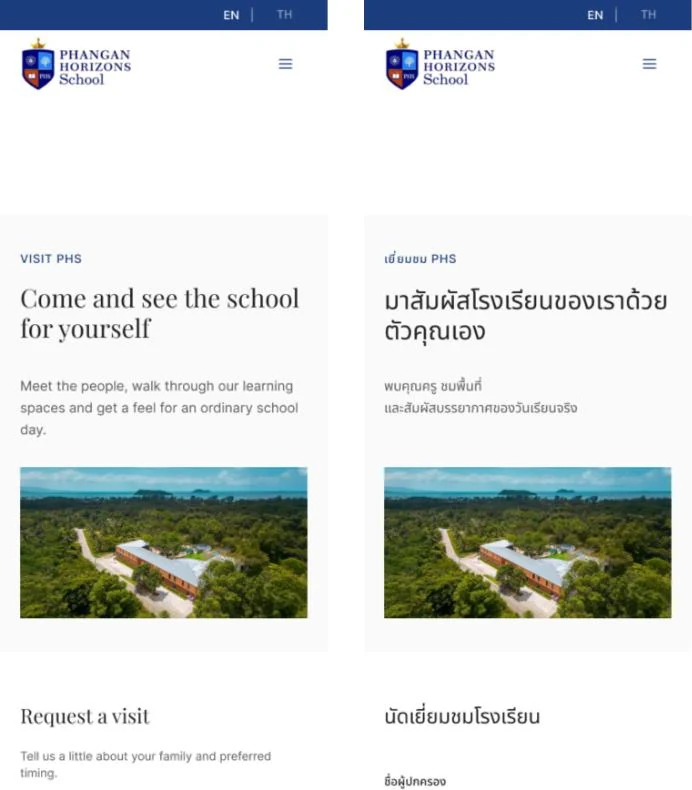
For most families, the website is the first touchpoint. I designed and built the new site around the questions families used to ask staff — and it is live and used by the school today.
Admission up front
“Admissions / How to apply”, “Tuition & fees” and “Book a visit” sit in the main navigation; “Ask about applying” leads the home page.
Four plain steps
Get in touch, visit the school, complete the form, receive a decision — plus fees, places by year group and what happens after an offer.
Bilingual, by need
An EN/TH switch on every page, and a year-group guide mapping UK, US and Thai levels to ages.
One public identity
A single school-domain contact address, the school’s Ministry of Education licence, and news and a calendar managed through a CMS.
AI assistant
Ask PHS — first answers without waiting
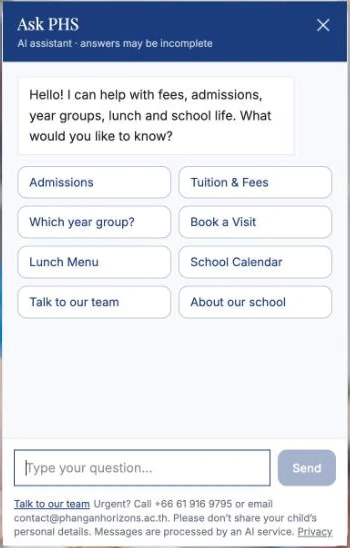
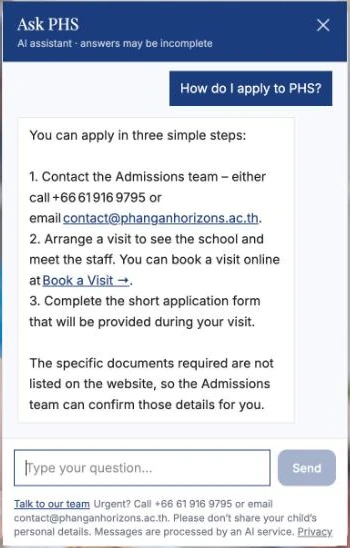
Many enquiries that landed on staff phones were the same few questions: how to apply, fees, which year group, visits. The website includes “Ask PHS”, an AI assistant that answers those from the school’s own information — and hands families over to a person when it should.
The idea came straight from the research: the board listed families’ most common admission questions as a starting set, and discovery found staff answering repeated messages late into the evening.
Design system
Designed as a system, in two languages
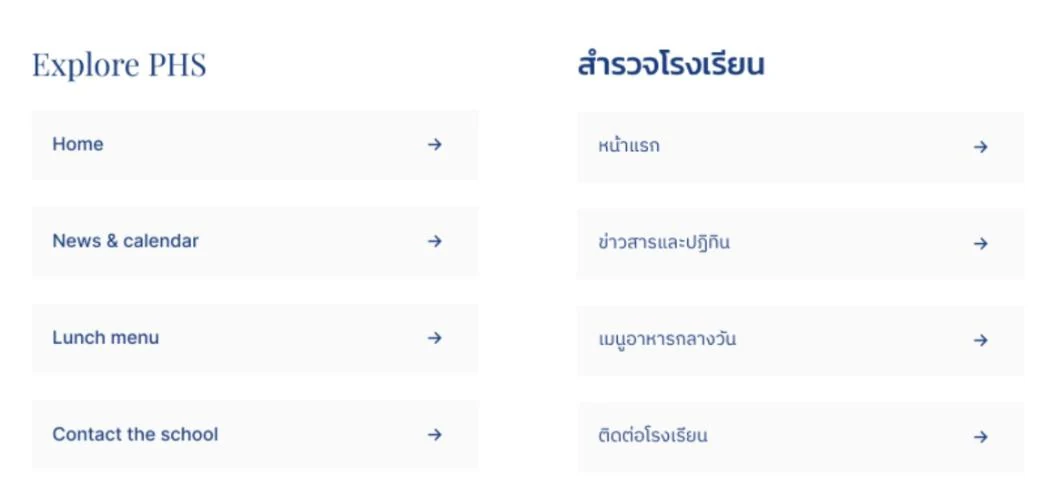
Before building, I designed the site in Figma as a hi-fi prototype — English and Thai, desktop and mobile — on a local design system, so staff-facing and family-facing pages share one visual language.
04For staff
From paper forms to one record.
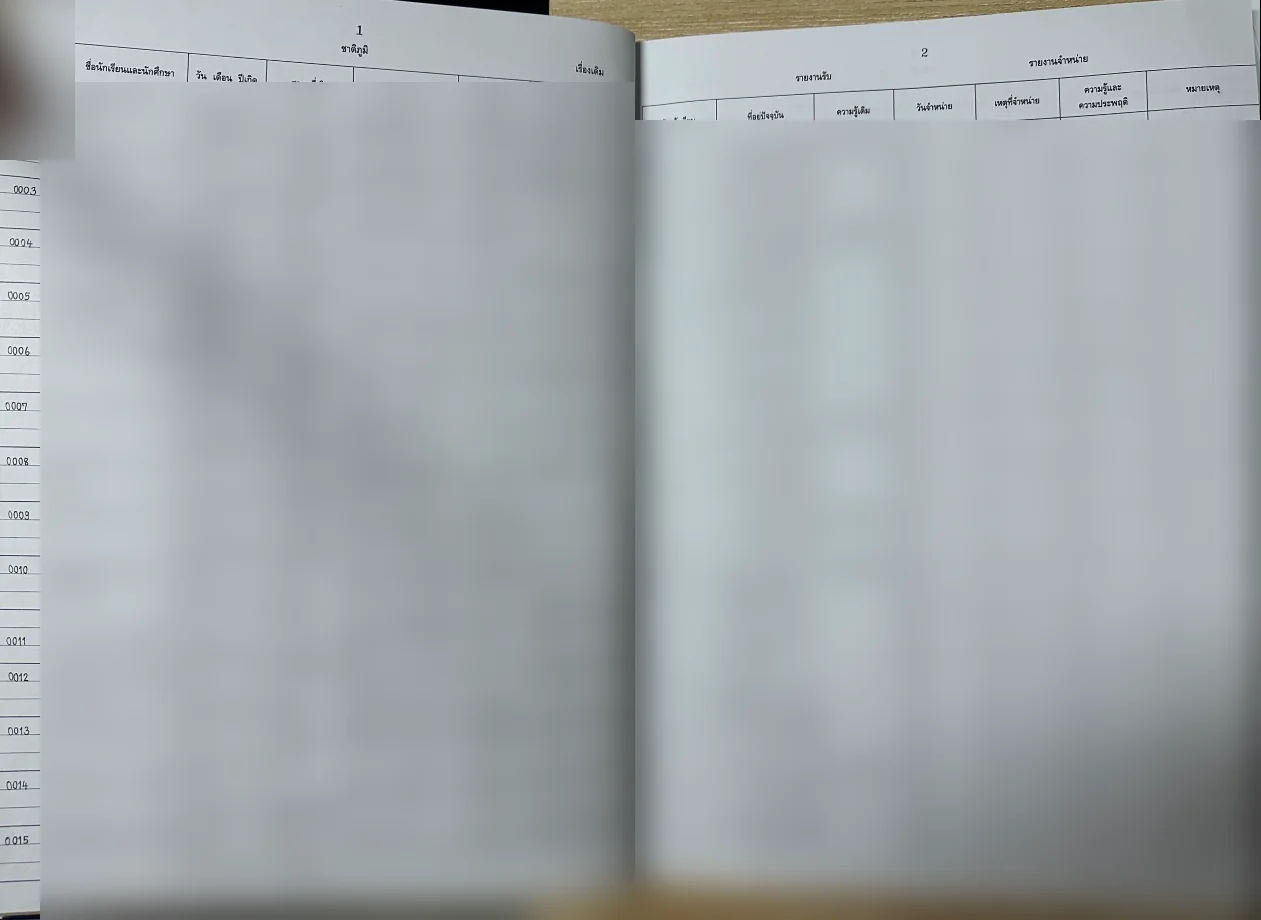
The old PHS paper form was replaced by School Bright’s online registration form, filled in on a school iPad during the visit or at a later appointment. Applicant information is captured once, in a structured way, and lands in School Bright from the first step — there is no separate file or folder to keep in sync.
Identity, email & communication
Google Workspace for Education
School-domain email under @phanganhorizons.ac.th, including the public contact address — so enquiries reach the school, not one person’s phone. Student records are not kept here; they live in School Bright.
Registration, records & government transfer
School Bright
Already in place but under-used. It now carries the whole record: the online registration form, the student profile after admission, student cards, and a one-click transfer to the government registration system — replacing the registrar’s manual re-typing.
Registration & administration
iPads
Used at registration to fill in School Bright’s online form instead of the old PHS paper form, so data enters the system at step one.
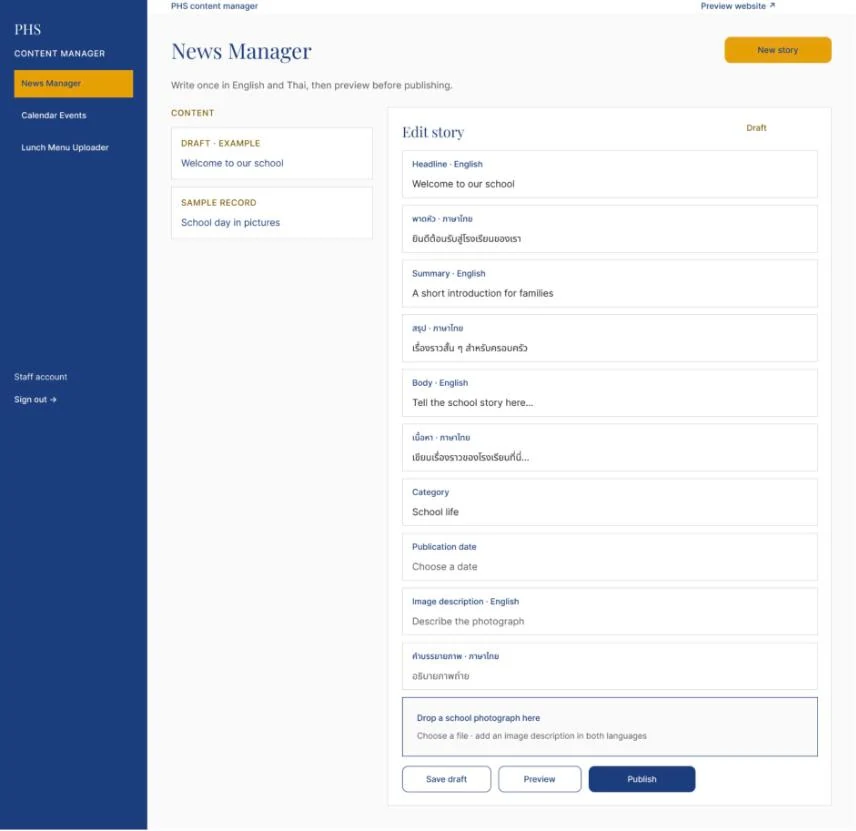
Content manager
Staff keep the website current — in both languages
A website only stays trustworthy if staff can update it without a developer. I designed a simple content manager, now live, for the three things that change most: news, calendar events and the weekly lunch menu.
- Write once, in English and ThaiEvery field has an English and a Thai version side by side, including image descriptions, so neither language falls behind.
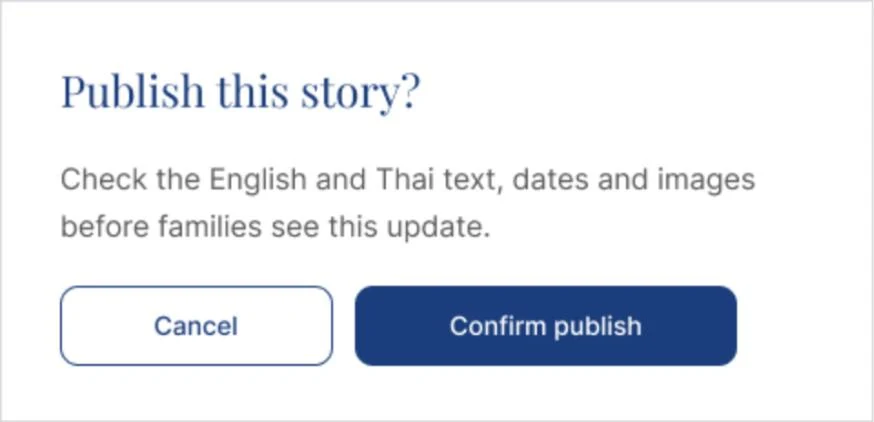
- Draft, preview, then publishStories and events start as drafts. A confirmation asks staff to “check the English and Thai text, dates and images before families see this update.”
- Three focused toolsNews Manager, Calendar Events and a Lunch Menu Uploader, behind a staff sign-in.
05What changed
What changed.
These are implementation changes, not measured results. Evaluation so far is limited to staff feedback; parent testing, an expert review and before/after measurement have not been carried out.
Reflection · Designing the hand-offs.
- A digital tool only improves admission when its hand-offs are designed too: where an enquiry lands, who owns it, and where the data goes next.
- Building in the school’s live environment meant real constraints and real use — but less room for structured testing. Next, I would run short sessions with three to five families on the live site, including a Thai-speaking and a prospective family.
- The same accounts and student records can now carry internal communication, attendance and grades. Admission worked as an entry point for the school’s wider digitalisation.
For the curiousSee the full processResearch methods, findings with evidence, prioritisation and the design system.
Mapping how admission actually worked.
The work started as a broad study of the school as a whole, then narrowed to admission — the place where communication, paperwork and the school’s public image meet.
Interviews / 01
9 staff · 4 parents
Semi-structured interviews across leadership, administration, liaison and teaching, and with Thai and international families.
Parent survey / 02
22 responses · Sept 2025
A bilingual Thai–English survey on finding information, communication, registration and next steps.
Desk research / 03
Forms & benchmarks
The printed application and enrolment forms, the old website, and other schools’ admission practice.
Synthesis / 04
Map, cluster, prioritise
A current-state journey map and service blueprint, affinity mapping, challenge clustering and impact–effort prioritisation.
The interviews followed broad guides about work culture and choosing a school, so the evidence is strongest on the staff and organisational side.
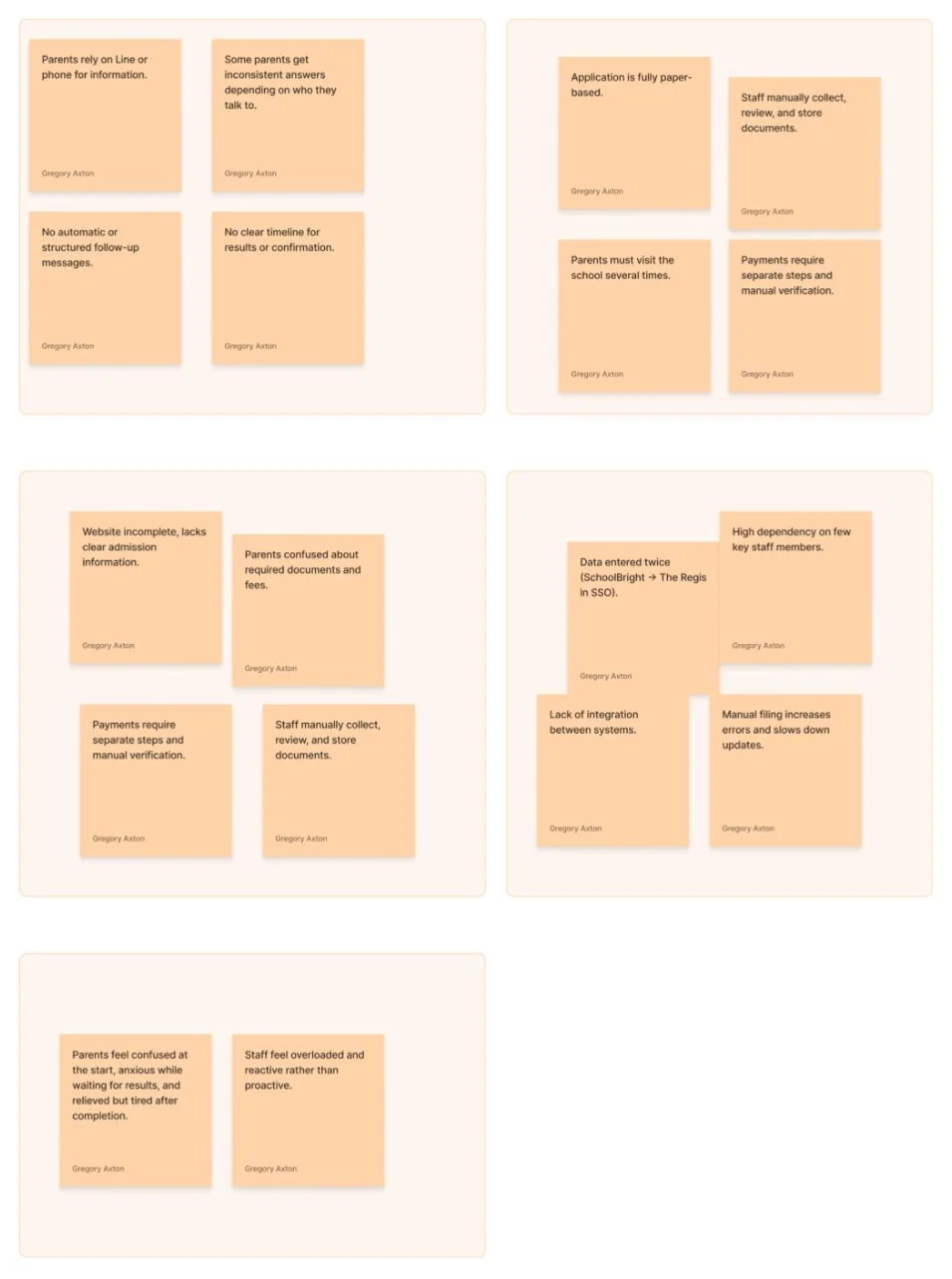
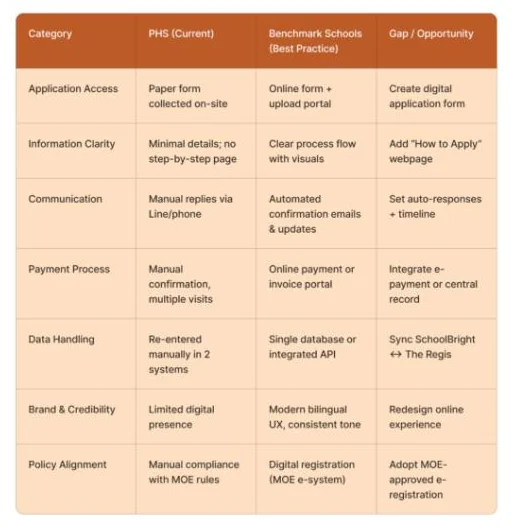
What the research showed.
Four findings shaped the admission work directly. Each follows the same path: the evidence, what it meant, and the design response.
Finding / 01 · Information
- Evidence
- The old website had no admission section, and parents were unsure about documents and fees. A survey response: “All information was missing as the website has not been completed yet.”
- Insight
- Parents depended on personal contact because the website didn’t support self-service.
- Design response
- A bilingual website with admission as a top-level section: four clear steps, fees, places by year group and a year-group guide.
Finding / 02 · Communication
- Evidence
- Enquiries arrived through LINE chats and private phones. Staff described missed notifications and answering messages late into the evening. A survey response: “Many of foreigners don’t use Line… response was very late.”
- Insight
- An enquiry depended on one person’s phone and attention. There was no shared inbox or record anyone else could pick up.
- Design response
- One school-owned contact address on Google Workspace instead of personal phones — and “Ask PHS”, an AI assistant on the website that answers common questions and hands over to the team.
Finding / 03 · Process
- Evidence
- The application was fully paper-based, and families visited the school several times to collect, complete and return forms.
- Insight
- The manual process slowed things down and made the school look less professional than it is.
- Design response
- School Bright’s online registration form on a school iPad replaces the old PHS paper form — completed during the school visit or at a later appointment, keeping a personal step without the paper.
Finding / 04 · Duplicated work
- Evidence
- The registrar recorded each student in a paper registration book, entered the data into School Bright, then entered it again into the government system. School Bright itself was present but under-used.
- Insight
- Staff time went into repeated data entry, and the school’s own platform had no clear place in daily work.
- Design response
- One record from the first step: registration data goes straight into School Bright, and after admission it is sent to the government registration system in one click — instead of being typed in again, one student at a time.
Broader context
The wider organisational picture
The problem-space research surfaced issues well beyond admission. They explain why school-owned accounts and a single student record became part of the work.
- Unclear responsibilities and overlapping roles
- Fragmented communication across informal channels
- Inconsistent tools — often personal accounts
- Workflow bottlenecks and slow hand-offs
- Limited cross-team collaboration
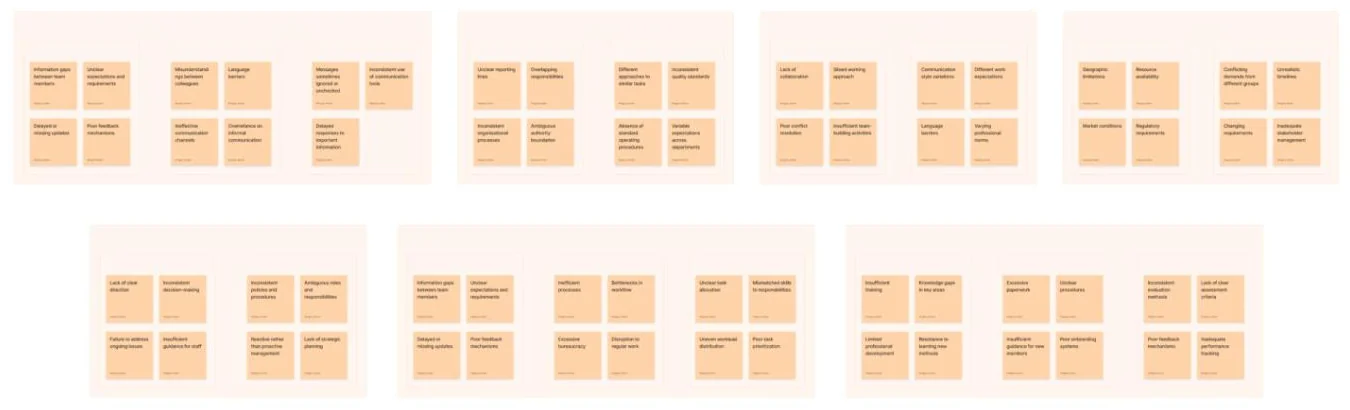
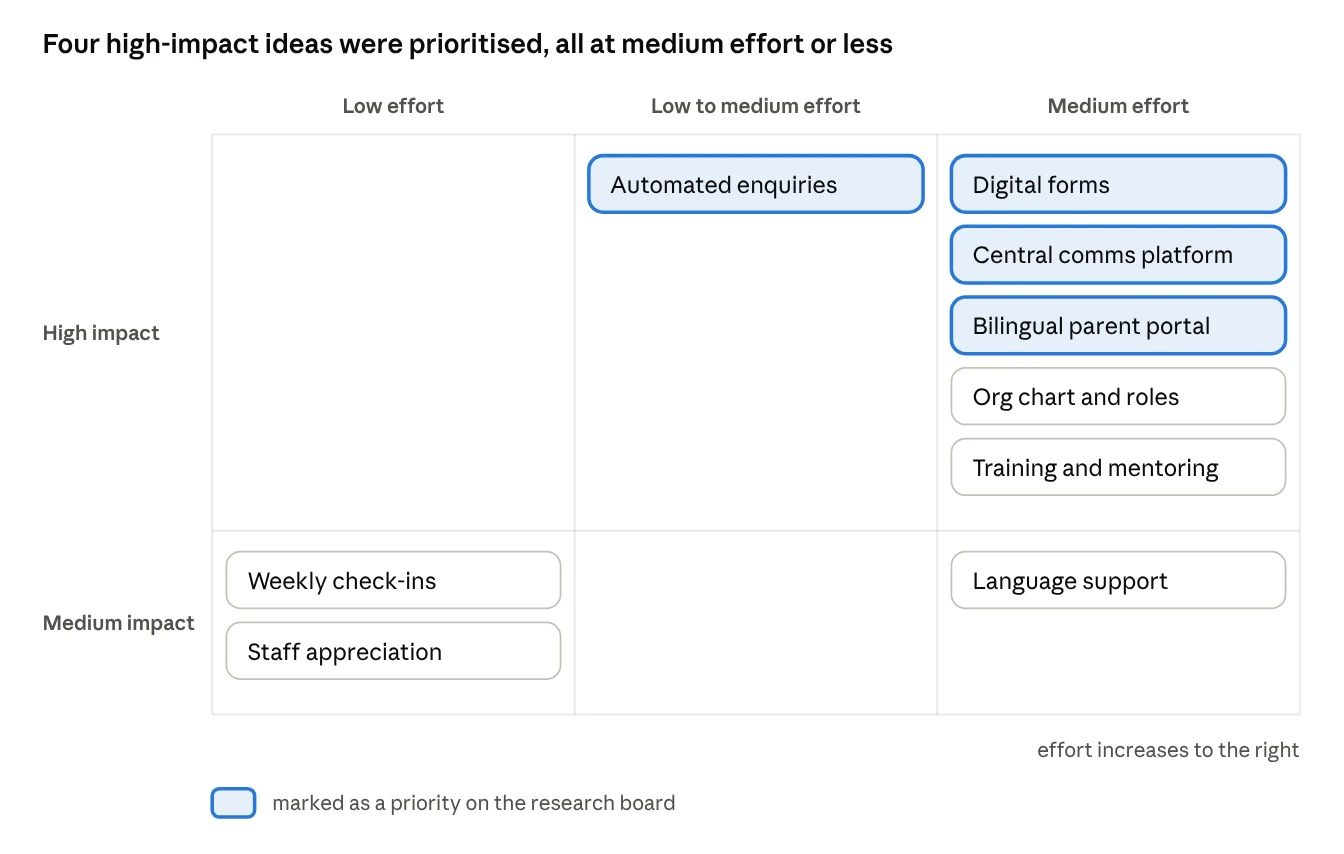
From many problems to two directions.
Insights became five “How might we” questions. Ideas were then rated for impact and effort, and two directions were chosen — one for families, one for staff.
- HMW 01How might we make the enrolment process clearer and easier for parents to follow from start to finish?
- HMW 02How might we reduce manual paperwork and data duplication for staff?
- HMW 03How might we improve communication so parents receive timely, consistent updates?
- HMW 04How might we integrate School Bright and the government registration system to streamline registration?
- HMW 05How might we create a digital self-service touchpoint that builds trust and reduces workload?
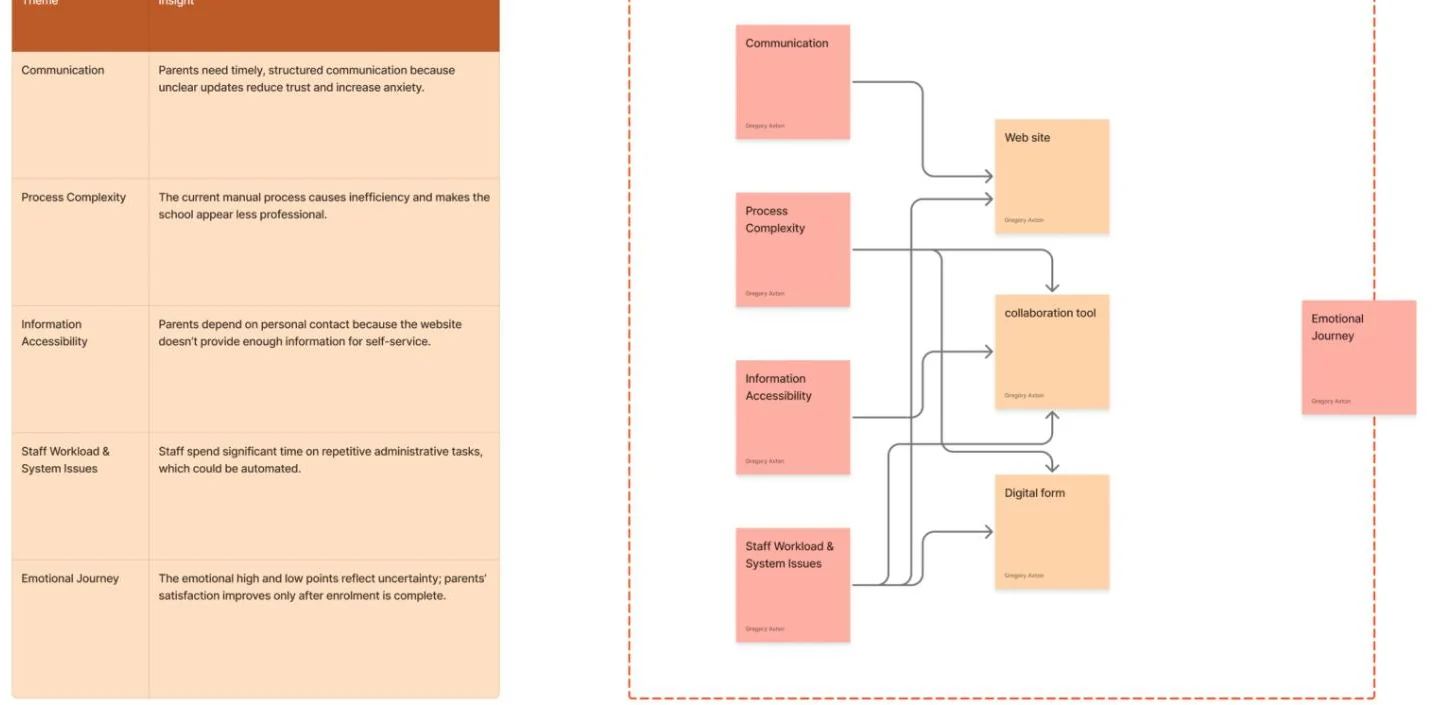
Direction / 01
Enrolment & school information
Parent-facing: the admission steps, digital forms, timely responses and clear school information online.
Direction / 02
Google Workspace & centralised communication
Staff-facing: school-domain accounts, shared drives and clear communication routines.
Designed as a system, in two languages
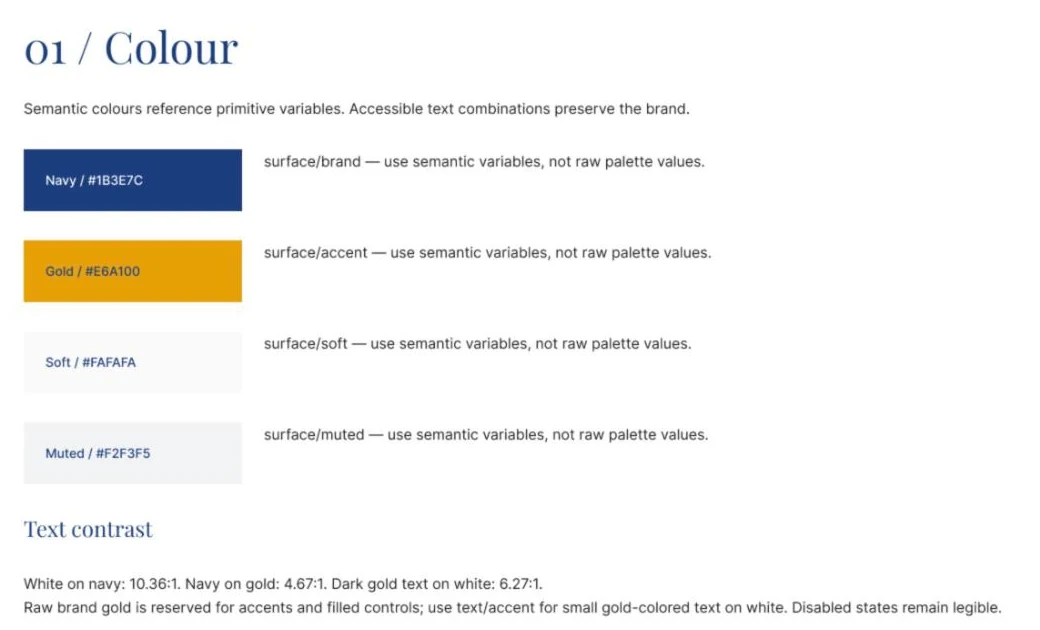
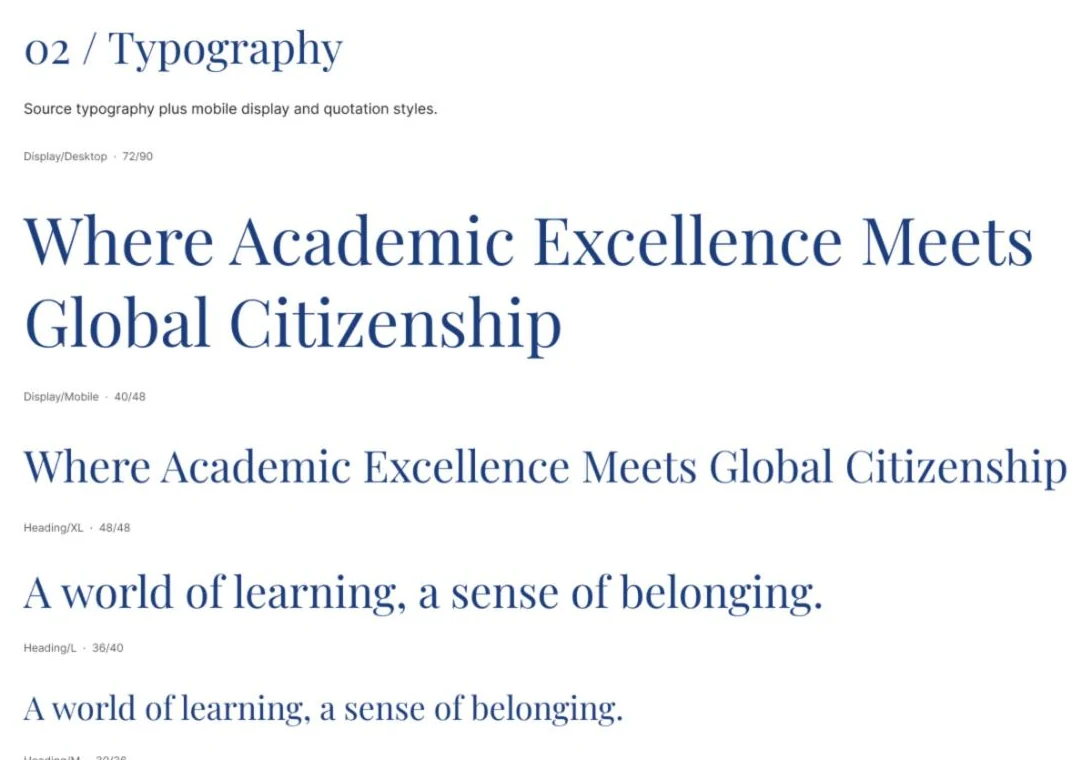
- Academic, editorial voicePlayfair Display headings with Inter for body and interface; Noto Sans Thai for Thai. Navy and gold from the school crest.
- Accessible by defaultColour pairs checked for contrast — white on navy 10.36:1, navy on gold 4.67:1 — and small gold text reserved for a darker accessible tone.
- One structure, two languagesThai and English share the same components and navigation destinations. Text boxes grow with Thai copy instead of being cut off.
- Built for parents’ questionsComponents such as the admissions step, year-group row, language switch, event listing and public form field come straight from the admission journey.
18 sections, from British-English content rules to motion, responsive and accessibility guidance.
Principles behind Ask PHS
- Honest about what it isLabelled “AI assistant · answers may be incomplete” — and when information isn’t on the website, it says so and points to the admissions team instead of guessing.
- Shortcuts for the usual questionsAdmissions, tuition & fees, which year group, booking a visit, lunch menu, school calendar and about the school — one tap each.
- A person is always one step away“Talk to our team”, plus the phone number and school email for anything urgent.
- Privacy by defaultFamilies are asked not to share their child’s personal details, and told that messages are processed by an AI service, with a link to the privacy page.
Next / Contact
Clear journeys, built on honest systems.
Next projectExplainable AI for prehospital careResearch · Safety-critical systems
contact@gregaxton.com